[Previous] [Main] [Next]

The Preview/Logger monitor


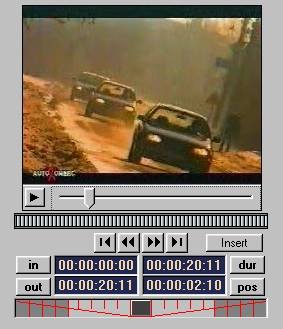
The Preview/Logger monitor in the Catalog window is where you will edit media files and create storyclips for your storyboard sequence. To edit a specific media file, simply double-click on its picon monitor or drag and drop the picon into the Preview/Logger area.The selected media file is immediately displayed in the monitor provided and you can begin using the logging button and tools to select the material you wish to use in the storyboard.

   4_2_1.jpg

Tips & Notes


·If the Preview/Logger monitor is hidden from view (moving the splitter), double clicking on a media file in the Catalog List will send the file to the Monitor window.  

·Double clicking on a media file already loaded into the Preview/Logger monitor will send the media file to the Monitor window.  

[Previous] [Main] [Next]