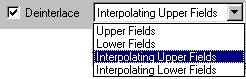
Essentially the Deinterlace option (when activated) allows you to playback the two fields of a single frame of interlaced video as two independent frames. This is useful when you are working with interlaced material and want to create slow motion effects (while preventing unwanted flicker) or else when you know the destined viewing source will use progressive scanning.
When you activate the Deinterlace option, Incite Media Assistant will deinterlace video material based on the currently selected deinterlacing method. The deinterlacing method can be chosen from the drop-down menu found just to the right of the Deinterlace option. You can choose from: