
| |
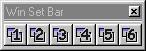
2. The Win Set Bar lets you set and save six predefined window arrangements. After arranging the three windows, right click on a preset button to save the arrangement as a preset.
3. The Move Splitter buttons let you quickly collapse or expand the "splitters" or dividers of the Catalog window. This lets you hide or reveal certain sections of the Catalog window on an as needed basis. For example, after locating a file folder, hiding the browser provides more viewing room for the Catalog List.

Tips & Notes
| · | Incite Media Assistant's interface can also be modified to accommodate slower computers. Disabling Graphic Style on Incite Media Assistant's View menu may help speed up response time.
|
[Previous] [Main] [Next]